
How to measure foot traffic
The cheapest way to measure foot traffic in your store is to take the transaction count your POS already produces and pair it with a rough estimate of how many people came through the door. That is it. No sensors, no subscription, no installation.
That sounds too crude to be useful, and for a lot of shops it is not. Plenty of retailers who buy a counting system never make a decision with it they would not have made anyway. This guide walks every method from free to enterprise, what each one actually measures, and where it misleads you. For the wider picture, start with the foot traffic guide.
Why measure at all
A visitor count on its own is close to worthless. “We had 480 people in on Saturday” tells you nothing you can act on, because you have no idea whether 480 is good.
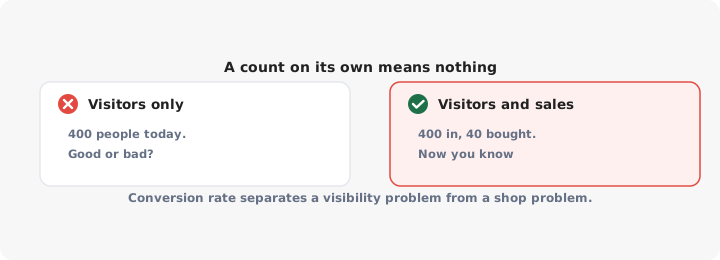
The number that matters is conversion rate: transactions divided by visitors. That single ratio separates the two problems you might have, and they have opposite solutions.
- Low traffic, high conversion. People who come in buy. You have a visibility problem, not a shop problem. Spend on getting more people through the door.
- High traffic, low conversion. People come in and leave empty-handed. Spending more on marketing pours water into a leaking bucket. Fix the shop first - staffing, stock, pricing, layout, queue times.
Most articles on this topic skip straight past this and treat footfall as the goal. It is not. Footfall is a denominator. If you only ever track one of the two figures, track the ratio, and track it against your own store last month rather than against someone else’s benchmark.
The free methods
Start here, and only move on when these stop answering your questions.
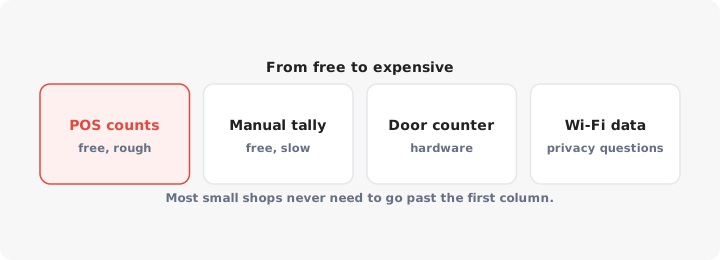
POS transaction counts. You already have these. Receipt count by hour and by day is the most useful retail dataset most small shops own and ignore. It is not a visitor count, but it has the same shape - the same peaks, the same dead hours, the same seasonality. For rostering staff or setting opening hours, transaction curves get you most of the way there on their own.
A manual tally. Give one staff member a cheap hand clicker, or a tally sheet by the till, and count everyone who walks in for a fixed window - two hours on a weekday, two on a Saturday, repeated for a few weeks. You are not counting the whole year. You are establishing a ratio between visitors and transactions. Once you know that roughly three people come in for every receipt, your POS data becomes a traffic estimate for free, forever.
Staff logs. Short structured notes beat gut feeling. Ask staff to record, each shift, how many people asked for something you did not have and how many left while queuing. This is qualitative and biased, and it still surfaces causes no counter ever will. A sensor tells you traffic dropped. A staff log tells you it dropped because the pavement outside was dug up.
The honest limitation of all three: they tell you nothing while the shop is shut, nothing about people who looked in the window and walked on, and nothing you can compare cleanly across branches.
Door counters
A door counter is the first piece of real hardware, and for most retailers it is the only one worth considering.
Single-beam infrared. A beam across the doorway, broken when someone passes. Cheap, battery powered, fitted with adhesive pads in ten minutes. It also counts your staff, your deliveries, your smoking breaks, and it counts two people walking shoulder to shoulder as one. Expect to inflate and deflate the raw number with rules of thumb. Fine for trend spotting, poor for absolute accuracy.
Overhead stereo or thermal sensors. Mounted above the door looking down, these see body shapes and can distinguish direction, so entries and exits are counted separately and groups are counted properly. Better models exclude staff by height or by a tagged entrance zone. Cost runs to the low hundreds per door for the sensor, often plus a monthly fee per site for the dashboard. Vendors quote high accuracy figures; treat them as a ceiling achieved under good conditions and not a promise for a crowded doorway.
Camera and video analytics. The same counting plus dwell time, queue length and in-store paths. This is where the price moves into mid and then enterprise tiers, and where you pick up real data protection obligations.
Whatever you install, the first fortnight of data is for calibration, not conclusions. Sit by the door for an hour, count by hand, and compare. Every counter needs its own correction factor.
Wi-Fi and mobile location data
Two different things get sold under the same promise.
Wi-Fi sniffing detects phones probing for networks near your store. It can give you a passerby count and a rough repeat visitor rate. It has become much less reliable than it was, because iOS and Android now randomise device identifiers, so the same phone looks like a new visitor on each visit and repeat-rate figures drift.
Aggregated mobile location data, sold by data providers, models visits from location SDKs embedded in apps. This is the only method that tells you about places you do not own - competitor stores, rival high streets, where your visitors live. That is genuinely useful for site selection and for attributing a campaign to visits. It is also modelled from a panel rather than observed, priced at the enterprise tier, and shaky at low volumes.
The privacy question is not optional. Both approaches process personal data under GDPR and similar regimes even when the vendor calls the output anonymous, and you are the controller for anything collected in your store. You need a lawful basis, signage and a vendor contract that stands up. Counting bodies with an overhead sensor avoids nearly all of that, which is part of why it stays the sensible default.
| Method | Cost | Accuracy | Tells you |
|---|---|---|---|
| POS transaction count | Free | Exact, but of sales not visits | When people buy |
| Manual tally | Free | Good in the window counted | Your visitor-to-sale ratio |
| Staff logs | Free | Subjective | Why the number moved |
| Infrared beam counter | Cheap | Loose, needs correction | Entries, roughly, by hour |
| Overhead stereo or thermal | Low to mid | Good | Entries and exits, by hour |
| Video analytics | Mid to enterprise | Good, plus in-store detail | Dwell, queues, zones |
| Wi-Fi detection | Cheap to mid | Weak and getting worse | Rough passersby |
| Mobile location data | Enterprise | Modelled | Trade areas, competitors |
| Business Profile insights | Free | Exact for intent, not visits | Who is looking you up |
Google Business Profile insights
Free, already switched on, and underused. Your profile reports how people found you, which search terms brought them, and how many asked for directions, tapped your phone number or clicked through to your site.
None of that is a visit. All of it is intent, which is upstream of one, and the direction request count in particular tracks real-world visits more closely than anything else you can get for nothing. Watch it weekly alongside your transaction count.
Insights also diagnose. A fall in profile views is a visibility problem in search, and the fix sits in Google Maps SEO, not inside your shop. Plenty of views but few direction requests means your listing is being seen and skipped, which points at photos, hours, categories and reviews - the things that decide whether you rank and get chosen on Maps.
A store locator on your own website gives you the same kind of signal for a chain: it shows which branches people look up. That is intent, upstream of a visit, not a measure of one.
Turning counts into decisions
Data you do not act on is a cost. Three decisions justify measuring at all.
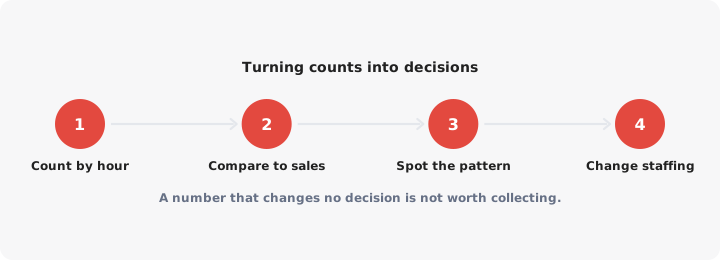
- Staffing. Plot visitors by hour against staff hours rostered. Look for the hours where traffic is high and conversion dips - that gap is usually understaffing, and it is the fastest payback in retail. Then look for the reverse: quiet hours with full cover.
- Opening hours. Count the last hour of trade separately. If it brings in fewer visitors than it costs in wages and lighting, close earlier. If the first hour on a Sunday converts well, open earlier. This is the decision a counter pays for fastest, because it recurs every week.
- Layout and merchandising. Compare conversion before and after a change, over equal periods, with traffic held in view. If traffic was flat and conversion rose, the change worked. If both rose, you cannot claim credit yet.
Then set a weekly rhythm: one figure for visitors, one for transactions, one for conversion, written down next to last week’s. Six months of that beats any dashboard nobody opens.
