
How to remove bad Google reviews
Most bad Google reviews cannot be removed. Google only takes down reviews that break one of its content policies - spam, a conflict of interest, off-topic content, prohibited content, impersonation. A review that is honest, harsh and unfair to you is none of those, so it stays. If somebody had a bad visit and said so in blunt terms, no form, no appeal and no paid service will delete it.
That is worth knowing before you spend a day on it. The pages that promise otherwise are selling hope. What follows is the part that does work: getting the genuinely policy-breaking reviews taken down, and making the rest count for less.
The honest answer: what can and cannot be removed
You cannot delete a review. Only two parties can: the person who wrote it, and Google. Everything you can do falls into one of three routes.
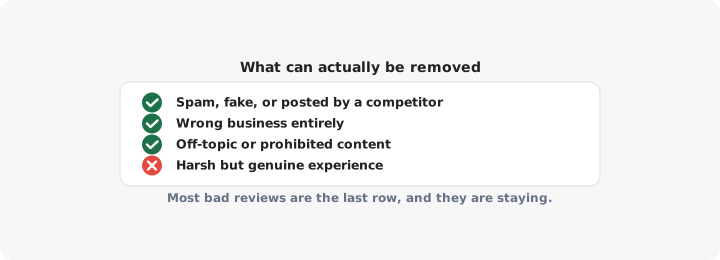
Google removes it because it breaks a policy. This is the only route that produces a deletion on request, and it only works when the violation is clear.
The customer removes or edits it themselves. People forget this is available. A reviewer can change their star rating or delete their review at any time, and a fair number will if you fix the problem and ask without pressure. On a specific, fixable complaint this is the highest-percentage route you have.
Nobody removes it, and you respond well and outweigh it. This is what happens to most bad reviews, and section five and six are about doing it properly.
Things that are not grounds for removal, however unfair they feel: a one-star rating with no text, a review you believe is exaggerated, a review from someone you cannot find in your booking system, a complaint about your prices, a complaint about something that was genuinely your fault, or a review of a bad day you have since fixed. Google does not decide who was right about what happened in your shop.
What actually violates Google’s policies
These are the cases worth flagging. Be honest with yourself about which column a review sits in - a flag on a merely negative review almost always comes back rejected, and it costs you time you could have spent responding.
| What the review is | Removable? |
|---|---|
| Spam, repeated posting, or a review from a fake or bot account | Yes |
| Posted by a competitor, an ex-employee, or anyone with a stake in your business | Yes - conflict of interest |
| Left in exchange for payment or an incentive | Yes - conflict of interest |
| Off-topic: politics, a rant about an unrelated company, general commentary | Yes |
| Prohibited content: slurs, hate speech, sexually explicit material, threats, personal information such as your home address or a staff member’s phone number | Yes |
| Impersonation, or a review written as if by someone else | Yes |
| Clearly about a different business, or left on the wrong branch of yours | Yes - but see below |
| Harsh, unfair, one-sided account of a real visit | No |
| One star, no text, no explanation | No |
| Factually wrong in your view, with no policy breach | No |
The wrong-business case is the one most worth checking if you run several locations. Reviews land on the wrong profile often: a customer searches the brand name, taps the first pin, and reviews a branch 40 miles from the one they visited. Flag it and say plainly that the experience described happened at another location, or at another company entirely.
How to flag a review, step by step
You do this from the profile itself, signed in to the Google account that manages it.
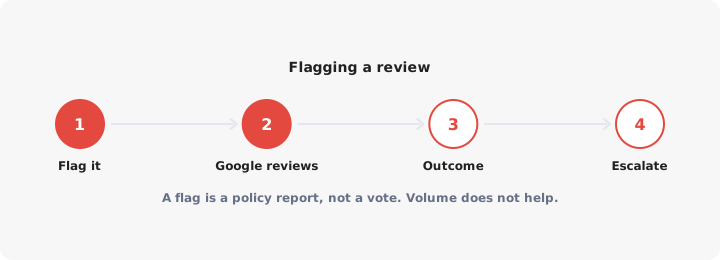
- Search your business name in Google, or find your profile in Google Maps, while signed in.
- Open Reviews in your business profile panel.
- Find the review. Click the three dots beside it.
- Choose Report review.
- Pick the reason that matches the actual violation - the categories mirror the policy list above. Choose the closest one rather than the most serious one.
- Submit, and leave it alone.
If you manage several locations or want a record of what you have reported, use Google’s review management tool instead. It lets you report a review and, more usefully, check the status of reports you have already made.
One warning. Do not ask staff, friends or customers to all flag the same review. Flags are not votes, there is no threshold that triggers removal, and coordinated reporting is itself the kind of pattern Google’s systems look for. One report from the profile owner is the whole play.
What to do when flagging fails
Most flags on borderline reviews come back as “no policy violation found”. When that happens:
- Check the status in the review management tool rather than reporting again. Re-flagging the same review does not escalate it.
- Appeal once, through the appeal option the tool offers after a rejected report. Make the appeal specific. “This review is unfair” goes nowhere. “This reviewer is a former employee, dismissed in March, and names a colleague” is a policy argument Google can act on.
- Contact Google Business Profile support if the review contains prohibited content - a threat, a slur, a phone number, somebody’s address. These cases are treated more seriously than quality disputes and are worth a human conversation.
Then stop. There is no third appeal, no published removal rate and no timeframe anyone can honestly quote you.
Two things not to do. Do not threaten the reviewer with legal action as an opening move - it is a slow, expensive route that frequently turns one bad review into a story about you. And do not delete your Business Profile to escape its reviews. This is the mistake almost no article warns about: the place stays in Google’s data, the reviews reattach when the listing is restored or merged, and operating a second listing for the same address puts both at risk of suspension. You end up with the same reviews and a damaged profile.
Responding well, when the review is staying
Your reply is not for the reviewer. It is for the next person reading, who is deciding between you and the pin above you on the map. That changes what you write.
A structure that works:
- Thank them and name the problem in their words. “You waited 40 minutes for a table you had booked.”
- Do not explain why it happened. Staffing, suppliers, the weather - every reason reads as an excuse.
- Correct one fact only if it matters, once, neutrally. Never two.
- Say what changed. This is the line that persuades readers.
- Move it offline. Give a name and a direct way to reach you.
Keep it under 80 words, sign it with a real first name, and never post twice. We cover reply templates and the wider habit of asking for reviews in the guide to Google reviews.
A good reply has a second benefit. A customer who feels heard sometimes edits their own rating - which is, again, the one removal route that does not depend on Google.
Burying bad reviews under good ones
This is almost always the real answer, and it is the one nobody searching in a panic wants to hear.
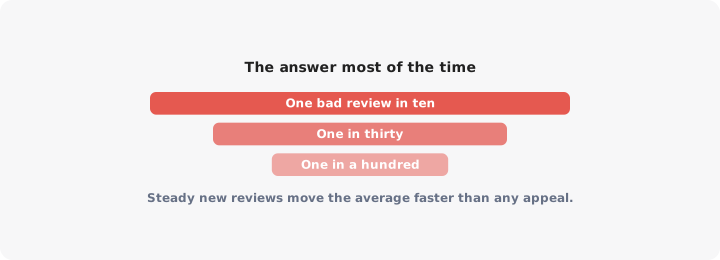
Run the arithmetic on your own profile. With 10 reviews, one one-star drops your average by roughly half a star and sits near the top of your listing for months. With 150 reviews, the same review barely moves the number and is three scrolls down. Nothing about the bad review changed. Your denominator did.
So build the denominator. Ask every satisfied customer, every time, in the moment - at the counter, on the receipt, in the follow-up email. A steady trickle of recent reviews also feeds how you place in local results, so the same work pays twice: see how to rank on Google Maps for where reviews sit among the other ranking factors.
If you run multiple branches, make sure customers can find the right one before they review it - a clear store locator on your own site cuts down on reviews landing on the wrong profile in the first place.
One bad review on a profile with a hundred good ones is noise. One bad review on a profile with four is your reputation. The fix is the same either way, and it is not a removal form. Start with the Google Maps SEO guide if you want the full picture.
