
Learn how to get found and rank higher on Google Maps.
Google Maps SEO is the work of getting your Business Profile to appear higher when someone nearby searches for what you sell. It runs on three things Google weighs together: how well your profile matches the search, how close you are to the searcher, and how well known your business is. Most of it is free, most of it takes an afternoon, and almost none of it requires an agency.
This guide covers the whole thing in order and links to a deeper guide for each piece. One sentence to act on first: your primary category is the most consequential field on the profile, and most businesses have the wrong one.
Regular SEO ranks pages. Google Maps SEO ranks places. That difference drives everything else.
Optimise a web page and the asset is a file on your server that you fully control. Optimise for Maps and the asset is a Google Business Profile - a record in Google’s database that you manage but do not own. Google can edit it, strangers can suggest changes to it, and Google can suspend it. Your website matters to Maps rankings, but it is an input, not the thing being ranked.
There is also no single result page. Web results are broadly the same for everyone searching the same words in the same country. Map results change with the searcher’s location, sometimes within a few hundred metres. Two customers in the same town can search “dry cleaner” ten minutes apart and see a different order.
So, in practice:
Google states its own three factors, and they are a genuinely useful model.
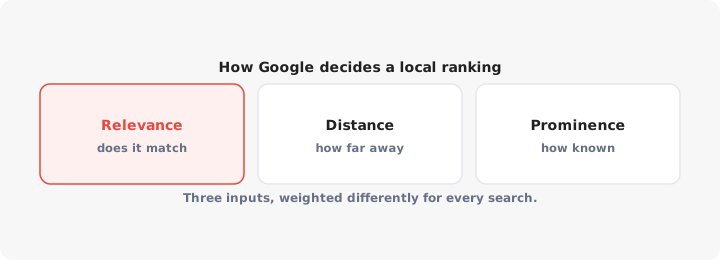
Relevance is how well your profile matches what was typed. The primary category carries most of the weight: it decides which searches you are eligible for at all. A business filed under “Restaurant” competes differently from one filed under “Vietnamese restaurant”. Secondary categories, services, products and attributes add detail, and your website’s content supports the picture.
Distance is measured from the searcher, or from the place named in the search. Someone typing “bike shop” outside your door gives you an enormous advantage. Someone typing “bike shop in Shoreditch” from across the city moves the centre of the results to Shoreditch instead.
Prominence is how well known the business is, online and off: reviews and ratings, links to your site, mentions in local press and directories, consistent name, address and phone number across the web, and your organic search presence. It is the slowest of the three to move.
The useful way to hold these together: relevance gets you into the running, distance decides your radius, prominence decides how far that radius stretches. A well-known business with a strong profile shows up for searches several kilometres away. A thin profile shows up only when someone is almost on top of it.
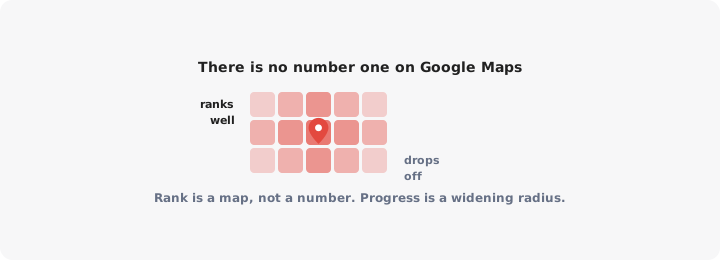
Articles promise to get you “number one on Google Maps”. There is no number one. Because distance is baked in, your ranking is a map rather than a figure - first on your own street, fourth four streets over, absent across town. Checking your rank from your own office tells you almost nothing, because Google already knows you are there.
Measure it as a grid instead. Take your main search term, check it from several points around your area - a few hundred metres out, a kilometre, two kilometres - and write down where you appear at each. That is your baseline, and progress looks like the same ranking holding at a greater distance, not a single number dropping to 1. Local rank-tracking tools automate this, but a notebook and a phone work fine for one location.
Not everything is worth the same. Roughly, in the order I would do them:
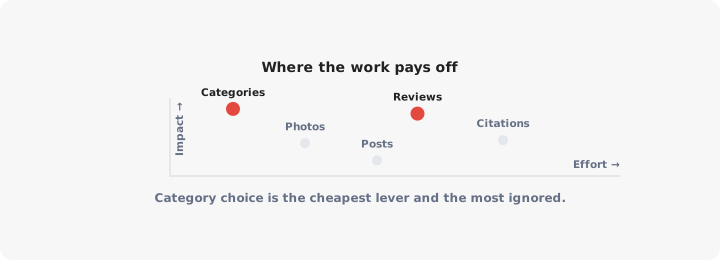
| What | Effort | Impact | Notes |
|---|---|---|---|
| Correct primary category | 5 minutes | Very high | Decides which searches you can appear for at all |
| Verified, complete profile | An afternoon | Very high | An unverified profile is invisible |
| Accurate hours, including holidays | 20 minutes | High | Wrong hours cost you “open now” searches and earn bad reviews |
| A steady flow of new reviews | Ongoing, small | High | Recency and volume both count |
| Secondary categories, services, products | An hour | Medium to high | Feeds long-tail and filtered searches |
| Real photos, added regularly | Ongoing, small | Medium | Drives clicks more than rankings |
| Location pages on your own website | A day per location | Medium | Supports relevance, and converts the click |
| Replying to every review | 10 minutes a week | Medium | Google asks you to; customers read them |
| NAP consistency across directories | A few hours | Medium | Fixes conflicting data more than it adds signal |
| Local links and press mentions | Slow, ongoing | Medium to high | The real lever in competitive markets |
| Google Posts | 10 minutes a week | Low for ranking | Useful for offers, not for position |
| Profile description keywords | 15 minutes | Very low for ranking | Written for humans, not the algorithm |
Two things worth saying plainly. The description does not move rankings, no matter how many keywords you fit into it - though it is read by people choosing between you and the next pin, so it still earns its 15 minutes. And daily Google Posts, which gets sold hard as a service, is a communication channel, not a ranking tactic.
Everything else depends on this being right, and a profile set up in ten rushed minutes two years ago is usually where the problem is.
Three states matter, and they are not the same: created, verified and complete. A created profile exists in your account. A verified profile is public and can rank. A complete profile ranks for more than your business name. Plenty of businesses sit at the second and assume they are done.
In order:
The step-by-step version, including what to do when the listing already exists or belongs to a former agency, is in how to add your business to Google. Verification is its own process with its own failure modes, from postcards that never arrive to video calls that get rejected over signage, and that is covered in verifying your business on Google.
For the description, write 750 characters on what you do, where, and why someone should pick you. If the blank box is the blocker, our free Business Profile description generator drafts one from a few details.
The map pack is the block of three local results with a map above them, near the top of the search page. It is where the clicks go, and position four is the top of a list nobody expanded.
The same three factors pick those slots, but with only three of them the competition is brutal. What tends to separate the businesses inside the pack from the ones just outside:
One detail worth knowing: Google often adds a line under a map pack result explaining why it is there - a quote from a review, a matching service, the words you searched for. Those justifications come from your reviews, services and website, so listing your services and collecting reviews that use customers’ own words makes you eligible for more of them. The map pack guide covers how those slots get filled and what to do when you are consistently fourth.
Reviews do two jobs, and the second is the bigger one. They feed prominence, so they affect where you rank. And they are read by the person deciding which of three pins to tap, so they decide whether ranking does you any good.
What counts, as far as anyone outside Google can tell:
The reliable way to get them is to ask in person, while someone is happy, and to remove every step between asking and posting. A Google Maps QR code on receipts, packaging or the window takes people straight to your listing. What you must not do is offer anything in exchange, screen out unhappy customers, or buy reviews - all three breach Google’s policies and risk the profile. Getting and handling Google reviews covers the asking systems that work.
Bad reviews are a separate problem. Most cannot be removed and should be answered calmly in public instead, because the reply is written for the next reader rather than the complainant. A minority genuinely do break Google’s content policy - fake, off-topic, from a competitor, personal attacks - and those can be reported. How to remove bad Google reviews covers which ones qualify and what to do when the first report goes nowhere.
Setup is a project; ranking is a habit. Profiles decay - hours drift, categories stop matching what you sell, competitors accumulate reviews, and Google adds fields to your category that you never fill in.
A workable rhythm for one location:
Weekly, ten minutes. Reply to new reviews. Answer Q&A questions, including asking and answering the obvious ones yourself - parking, accessibility, booking. Add a photo if you took one.
Monthly, an hour. Re-check your ranking grid and note any movement. Read the profile’s performance data: searches that led to you, calls, direction requests, website clicks. Compare your review count with the businesses that outrank you.
Quarterly. Re-check categories against Google’s current list, which changes, along with the services and attributes offered for your category. Refresh photos. Confirm your name, address and phone number match everywhere you are listed, and watch for profile edits you did not make - anyone can suggest one, and hours and categories are the usual casualties.
When rankings stay flat despite all this, it is usually one of four things: the wrong primary category, not enough prominence to reach that far, a competitor set you are genuinely behind on reviews, or a profile problem such as a soft suspension you have not noticed. Ranking higher on Google Maps works through which one it is.
The mechanics are the same per location. The management is not.
Ranking on Maps is only half of it. What someone does after they find you - whether they actually walk in - is covered in our foot traffic guide.
Each branch needs its own profile, verification, address, phone number and reviews. There is no shortcut where verifying one verifies the rest. Past a handful of locations, use Business Profile Manager to group locations, import them in bulk from a spreadsheet and request bulk verification.
Three things matter more as you add branches:
Then there is the part Maps SEO does not solve. Ranking gets someone to tap your pin or click through. The visitor who arrives from an ordinary search, a social post or a printed advert lands on your homepage with no idea which branch is nearest. A searchable store locator on your own site closes that gap, which is what LocateStore does from a Google Sheet of your locations.
Start with the category. Verify the profile, complete it properly, build the review habit, check your grid monthly. That is Google Maps SEO - less glamorous than it is sold as, and entirely doable yourself.
Found on Maps, lost on your website?
Ranking on Maps gets people to your brand. A searchable store locator on your own site gets them to the right branch, with hours and directions. Build one from a Google Sheet, free.
Create a MapIf you have more questions, feel free to contact us
Help customers find your locations easily
