
The map pack
The map pack is the block of three local businesses Google shows with a map near the top of the results page, when it decides your search has local intent. Each entry carries a name, star rating, review count, category, address and usually a call or directions button. On a phone it fills most of the first screen.
It is the most valuable real estate in local search, and only three businesses get in at a time. This guide covers what it is, what it is actually called, how Google picks the three, and what you can do about it. For the wider picture, start with the Google Maps SEO guide.
What the map pack is
Google runs two different indexes. One is the web index of pages. The other is a local index of places - business profiles, with coordinates, categories, hours and reviews attached. The map pack is a window onto that second index.
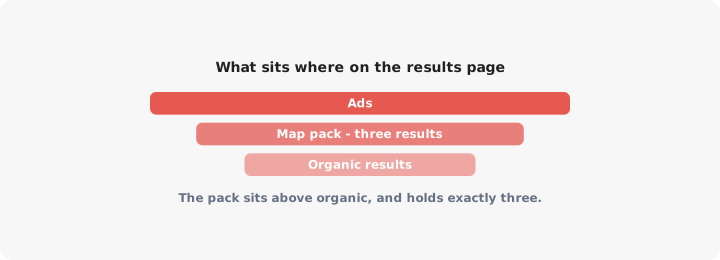
When you appear in the map pack, Google is not ranking a page on your website. It is ranking your Google Business Profile. The listing links to the profile, and the phone number, hours and photos all come from it. Your website is one input among many, and a minor one.
So you can have the best website in your city and not appear in the pack, while a competitor with no website at all sits at the top of it. If nobody has added and claimed a Business Profile, there is nothing for Google to rank.
Google shows the pack when it reads local intent in the query. That covers the obvious (“plumber near me”, “dentist Manchester”) and plenty that is not: “coffee”, “haircut” or “tyres” typed on a phone usually returns a pack with no location mentioned at all, because Google already knows where the phone is.
Map pack vs local pack vs organic results - the naming, settled
Most articles use these terms loosely and leave you unsure whether they are different things. They are not, mostly. Here is the whole picture.
| Name | What it refers to |
|---|---|
| Map pack | The three local results with the map. |
| Local pack | The same three results. Identical meaning. |
| 3-pack | The same thing again, named for the count. |
| Snack pack | An old nickname from when it shrank to three. Dated but still heard. |
| Local results | Google’s own term for it in Business Profile documentation. |
Map pack and local pack are the same thing. Use whichever you like. “Local pack” is the older term, from when the block did not always include a visible map; “map pack” took over once the map was always there. Nobody will misunderstand you either way.
What are genuinely different things, and where the real confusion lives:
- The Local Finder. Click “More places” or the map itself and you get a longer, scrollable list of local results. A separate surface with its own ordering, so ranking eleventh there is not the same as ranking eleventh in the pack, which has only three slots.
- The Google Maps app or maps.google.com. A third surface. Similar signals, but results often differ from the pack for the same query, because the map is zoomed and panned rather than centred on you.
- Organic results. The blue links below the pack. These rank pages, from the web index. Your location page can rank fourth organically while your profile ranks nowhere in the pack, and vice versa. They are separate competitions with separate levers.
That last one is the practical takeaway. If someone says “we’re ranking well for plumber Leeds”, ask which result they mean. Third in the pack and third organically are different achievements, worth different amounts of traffic.
Why only three results show, and how Google picks them
The block used to show seven. Google cut it to three in 2015, when seven entries no longer fitted a phone screen without burying everything else. It never went back.
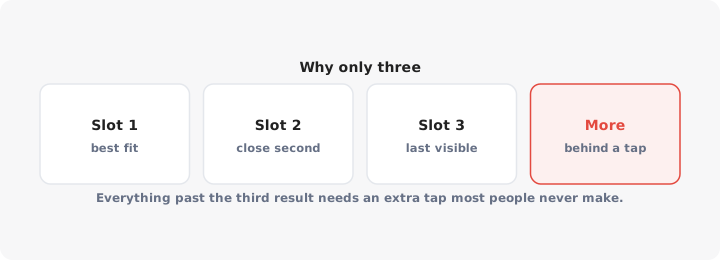
Three slots makes local search closer to winner-takes-most. Position four is not “just outside the top three” - it is behind a link most people never tap.
Google states three factors for how it chooses local results:
- Relevance. How well your profile matches what was searched. Your primary category does most of this work.
- Distance. How far each candidate business is from the searcher, or from the place mentioned in the query.
- Prominence. How well known the business is, drawn from reviews, links, articles, directories and general web presence.
They are not weighted equally, and the weighting shifts by query. For “emergency locksmith” at midnight, distance dominates. For “wedding venue”, people will travel, so distance relaxes and prominence matters more.
The ranking factors specific to the pack
These are the levers that move the pack specifically, roughly in order of how much they do:
- Primary category. The most consequential field on your profile. Pick the most specific one that genuinely describes you: “emergency plumber” and “plumber” return different packs. If the category is wrong or vague, nothing else you do will fix it.
- Proximity to the searcher. The one factor you cannot optimise. You can only decide where to open, and most people have already decided.
- Review count and average rating. Both are visible in the pack itself, so they drive clicks as well as rank. Our guide to getting more Google reviews covers how to ask without breaking Google’s rules.
- Review text. Google reads what reviewers wrote, not just the stars. Reviews mentioning the service and the area help you appear for those terms, which is why asking “what did we do for you?” beats asking for five stars.
- Profile completeness. Hours, service areas, attributes, services, products, photos. An empty verified profile ranks worse than a full one. The description does not appear to affect rank, but it does affect whether someone picks you - our free Business Profile description generator will draft one.
- Name and keywords in the name. Stuffing keywords into your business name does work, which is exactly why competitors do it. It also gets profiles edited or suspended. Do not.
- Your website’s local signals. A page on your site about that location, with consistent name, address and phone details, supports the profile. See optimising for Google Maps for this in detail.
- Citations and consistency. Your details repeated identically across directories and your own site. Low ceiling, but inconsistency actively hurts.
- Engagement. Clicks, calls, direction requests and photo views. Not directly controllable, but they respond to everything above.
How to check your current pack position
Here is the thing most articles skip, and it changes how you should read every rank report you have ever been shown.
The map pack is assembled for each searcher’s coordinates, not for a town. Two people on opposite sides of the same high street can search the same words at the same moment and get two different sets of three businesses. So “we rank third for dentist Bristol” is not a fact. It is a fact only once you add “from where” - third from the city centre, nowhere from the suburbs three miles north.
What this means in practice:
- Searching your own business name proves nothing. Branded searches always show you. It feels like a rank check and it is not.
- Incognito mode does not help much. It removes your search history, not your location. Google still places you by IP address or device location.
- Searching from your own premises is the most flattering possible test. You are standing at the point where your distance score is zero. Of course you rank.
- The Performance tab in your Business Profile does not report rank. It reports searches, views, calls and direction requests. Useful, but it will never tell you what position you hold.
To get a real answer, use a grid-based local rank tracker. These sample the same query from dozens of coordinates across your area and hand back a grid of positions - a map of where you win and where you do not, which is the only honest shape for this data. Without a tool, approximate it: run the same search from four or five places a few miles apart and note what comes back.
Getting in: a practical checklist
In order. Each step assumes the one above is done.
- Claim and verify the profile. Unverified profiles do not appear. If a listing for your business already exists, claim it rather than creating a second one.
- Fix the primary category. Check what the current top three in your target area use, then pick the most specific accurate match for you.
- Add every secondary category that truly applies. Each makes you eligible for more queries; irrelevant ones dilute you.
- Drag the map pin to your actual entrance. Automatic placement often lands mid-building, and the pin drives both walking directions and the distance calculation.
- Fill in hours, including holiday hours. Showing as open when you are closed earns one-star reviews, which cost you rank.
- Add real photos, starting with an exterior shot taken from the direction customers approach from.
- Complete services, products and attributes for your category. These feed filtered searches and the “offers delivery” style labels in the pack.
- Build a review habit, not a review campaign. Steady reviews, answered promptly, beat a burst of twenty followed by silence.
- Give each location its own page on your website, linked from that location’s profile. Never point multiple profiles at your homepage.
- Re-check the grid every month. You are watching the shape of your coverage change, not a single position.
Why you rank in one suburb and not the next one over
Because distance is measured from the searcher, not from the town centre, your map pack performance is a territory, not a rank. It has a shape, and the shape has edges.
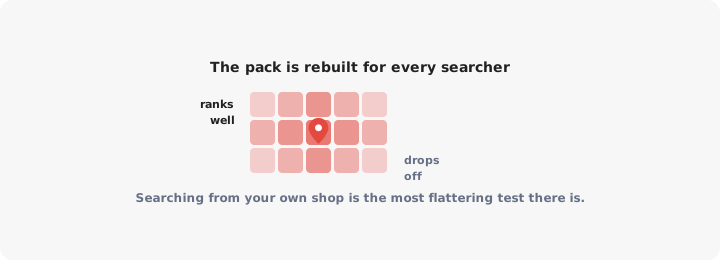
Picture a competitor two miles east. Somewhere between you is a line where their proximity advantage overtakes yours. Searchers east of it get them, searchers west get you. All else equal, you each own a catchment. That is why your rank “drops” in a suburb you never ranked in anyway.
What moves the line is the part you control: prominence and relevance. A well-reviewed business with strong local coverage holds a wider territory than an identical business with a handful of reviews, because Google will show it to people slightly further away. That is the real prize for doing the work - not a higher number, but a bigger area.
What does not work: virtual offices, mail-drop addresses, or extra profiles for areas with no staffed premises. Google treats these as fake locations, and the penalty is losing the profile you already had.
The honest limit: if your customers are spread across a region, no amount of profile work puts your pin in front of all of them. The pack sends each searcher to one branch’s profile, and whoever clicks through to your site then has to work out which of your locations is nearest. That gap is a job for your own website - a searchable store locator answering “which one is closest to me”, which is what LocateStore builds from a Google Sheet of your locations.
Get the category right, verify the profile, keep the reviews coming, and measure your position as a map rather than a number. The three slots do not get any wider, but your share of the ground they cover does.
