
How to verify your business on Google
You verify your business on Google by requesting verification from the profile, then completing whichever method Google offers you: a postcard, a phone call or text, an email, a recorded video, a live video call, or an instant pass if your website is already in Search Console. Google decides which methods you are eligible for. You pick from that list and nothing else.
No profile yet? Start with adding your business to Google. Profile stuck or rejected? Read on - that is most of this page.
Why verification is required at all
Anyone can put a place on Google Maps, and Google builds listings from aggregators, Street View and public submissions too, so the map is full of places nobody has confirmed. Verification proves you control the business at that address, which is why it asks for things only an owner or manager has: keys, the till, the back room, the mail.
Until you pass, the profile does nothing - not in Maps, not in local results, not visible to customers. Added and verified are two different states.
The methods Google might offer you
What appears depends on your category, your country, the age of the listing and whether anything looks unusual to Google. Expect one or two, not six.
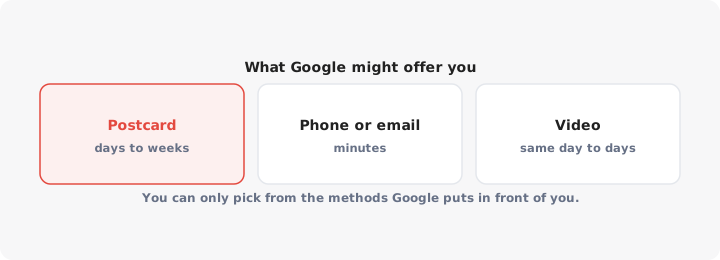
- Postcard by mail. A card with a five-digit code arrives at the address on the profile. Make sure the name on it gets past your mailroom.
- Phone call or text. A code goes to the number on the profile, so that number has to ring at the business - not through a switchboard or a menu system that eats the call.
- Email. A code goes to an address Google chooses, usually one on your business domain. No substituting a Gmail address.
- Recorded video. You film your location and your access to it; a reviewer watches it. More below.
- Live video call. You walk a support agent around in real time. Same evidence as the recording, but the agent tells you what else to show.
- Instant verification via Search Console. If the website on the profile is already a verified property in your Search Console account, under the same Google account, verification can complete immediately with no code. Check this first: it is the fastest route and the one most people never try.
One point causes more confusion here than everything else combined: you cannot request a method Google has not offered. There is no setting for it. If the screen shows video only, your choices are to film it or to wait.
Video verification, the one that trips people up
Video is the most common method and the most commonly failed. Reviewers look for three things, and a video showing two of them gets rejected.
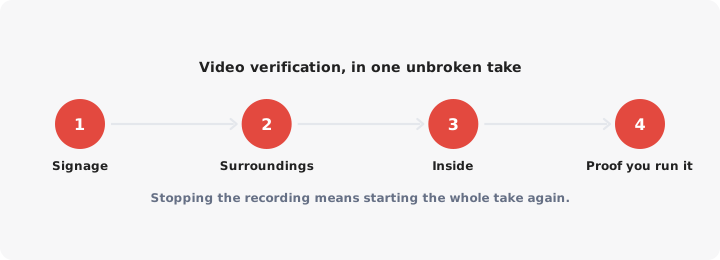
- Your location. Start outside. Film the street, the building number, your signage and a neighbouring landmark, so the reviewer can place you on the map.
- Your business. Go inside and show what you do: equipment, stock, branded uniforms, the treatment room, the kitchen, the workshop.
- Your authority over it. The one people miss. Show something only a manager reaches - unlock a door, open the till, step into the back office or stock room, show a bill in the business name.
Practical rules:
- One unbroken take. No stopping, pausing, cutting or editing. Walked into a dead end? Keep filming and walk back out.
- Record inside Google’s flow, on the device it asks for. You are not uploading a clip you made last week.
- Film in daylight, during opening hours, lights on and sign lit. Thirty seconds to two minutes is plenty.
- No storefront? Film the branded vehicle, the equipment, the licence and the home office instead.
How long each method takes
| Method | How it works | Typical time to verified |
|---|---|---|
| Search Console | No code, matched automatically | Immediate |
| Phone or text | Code arrives in seconds | Minutes |
| Code arrives in minutes | Minutes | |
| Live video call | Checked during the call | As soon as you get an appointment |
| Recorded video | A reviewer watches it | Google says around five business days |
| Postcard | Posted to your address | Google says to allow up to 14 days |
The postcard clock is postal, not digital, so it runs longer in rural areas and over holidays. Requesting a replacement invalidates the first code: if both cards arrive, only the newer one works.
When verification fails, and what to do
A rejection says nothing about whether your business is real. Usually a detail did not line up:
- Signage not visible in the video, or filmed after dark.
- No proof of authority - a tour any customer could have filmed.
- Address mismatch. The unit, suite or floor formatted differently from the postal record.
- A phone number that reaches a call centre or an automated menu.
- A name that is not on the premises, or stuffed with extra keywords.
- Category and premises disagreeing, like a restaurant category on a bare office.
Then, in order:
- Read the reason Google gives, in the profile or the email, and fix that, not something else.
- Do not resubmit the same video. An identical take sent back in hope of a kinder reviewer is the commonest wasted week. Reshoot with the missing evidence in frame.
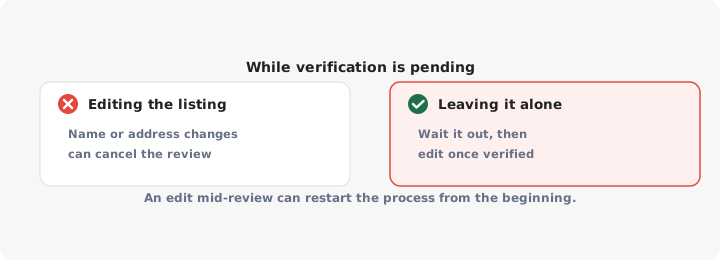
- Fix the profile data between attempts, not during one. Editing the name, address or category while a verification is pending can cancel it and send you back to the start. Almost nobody mentions this, and it turns one failure into three.
- Appeal if the fix does not work. Business Profile support has an appeal form that puts a human on the case - the right escalation once the on-screen method is exhausted.
- Expect a cooldown. After repeated failures Google may withdraw a method for a while. Waiting is sometimes the correct move.
And never create a second profile while you fix the first. A duplicate splits your reviews and can get both suspended.
Re-verification after moving, renaming or a change of ownership
Verification is not permanent. Google re-checks when the facts change.
- Moving. Update the address on the existing profile rather than starting a new one. Reviews, photos and history travel with it; a new profile leaves a stale pin behind and your reviews at zero.
- Renaming. Match the signage, and change the signage first if that has not happened. A name with no physical evidence behind it is the easiest way to fail a re-check.
- Change of ownership. The new owner requests access to the existing profile and re-verifies. Nobody deletes anything.
During a re-check the profile may stay live, or be hidden until it passes. Plan for the hidden version and make the change in a quiet trading week.
Once verified, the job shifts to ranking on Google Maps: categories, reviews, photos and proximity. The rest of the series sits in the Google Maps SEO guide. And a verified pin only helps the customer already on the map - the one who lands on your website still needs a store locator to find their nearest branch.
